
LoongBuy order guide: links, options and warehouse review
Use the spreadsheet to shortlist a product, then keep the original listing URL. On LoongBuy, resolve the listing and review the details before adding it to an order. The agent’s current interface and checkout terms govern the purchase.
Find a listing worth checking
Browse the category directory or search for a product name. Open the seller’s listing and compare measurements, recent buyer photos, variant choices and return terms. An attractive thumbnail is only a starting point.
Record your exact choices
Choose size, colour, version and quantity in the agent’s form. Include a useful note if the product has custom options. Check the product subtotal and domestic delivery amount before payment.
Review the warehouse arrival
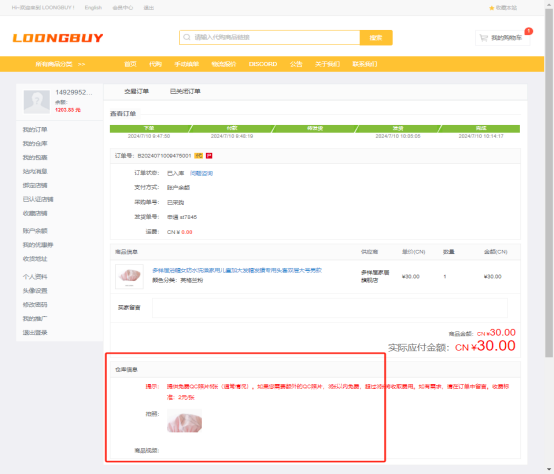
Open the order’s warehouse photographs and compare them with the saved listing and selected variant. Resolve missing information before you submit the goods for international shipment.
Submit and track your parcel
Check available routes, restrictions, destination details and the live freight quote. Keep the tracking number and payment record. After delivery, photograph any damage and keep the packaging while a problem is investigated.
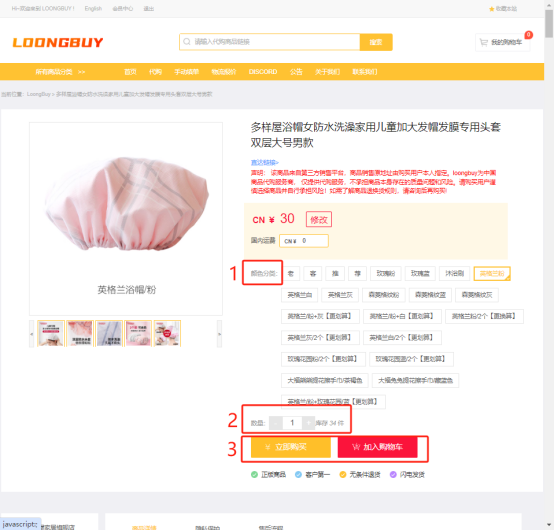
Three inputs the search field accepts
The operator's search field declares its own scope: "Product link or name / Store link", with a small image-search control beside the box (seen on the interface, 10 October 2026). Three inputs, three different grades of instruction. The official home page compresses the first step to Submit Order, paste the link and pay, and LoongBuy orders from the seller. Only one of the three arrives in that finished state.
The complete instruction
A link to one listing names the platform, the seller and the exact product page, so it can be executed without a conversation. Payment at submission is the first of the two the FAQ describes, the goods now and the international freight later (FAQ, Seen 11 October 2026), under the fee model described in the FAQ captured on 10 October 2026. The order exists the moment the payment does.
A search, not yet an order
A name returns candidates, and candidates are not instructions. Nothing is bought on the strength of a word; the result is a set of listings from which a seller and a price still have to be picked. The small image-search control beside the field does the same work from a picture. Either way, the order begins only when a specific listing is chosen.
The seller fixed, the goods still open
A shop address settles the counterparty and nothing else. It produces a view of the seller's shop rather than an order, which is useful when the shop is the point, a seller already trusted, a line of related goods. Price, options and specification are properties of a single listing, so the instruction completes only when one listing-level URL comes out of it.
Inside the URL, and what must be written beside it
A product URL is dense in one direction and empty in the other. It fixes where the goods come from; the option boxes on the listing page stay behind. That matters because the standard check includes "a basic order-information match" (Inspection Information page, updated 4 September 2026), and a match can only run against what the order says.
- IN THE LINK
The part the address settles
Platform, shop and listing identity travel inside the address. For sneakers, t-shirts, hoodies and jeans, common clothing and footwear categories, the URL identifies a listing, but its options and price still need checking.
- IN THE OPTIONS
The choice the link leaves open
Any category can offer several variants under one URL. Confirm colour, size and version in the option fields. When a listing has minimum quantities or price tiers, confirm the quantity and unit price together; these are seller terms, not a property of the category.
- THE MATCH
A comparison against the order, not intent
The warehouse compares arrivals with the order's stated fields, nothing wider. A size that never reached the order is a size nobody compared; the photographs can be immaculate while the parcel is wrong. The check reads the order, and the order reads what was written beside it.
- THE PRICE
Order information that can still move
The figure paid at submission is provisional. The Additional Payment page, updated 14 April 2026, names "the seller's actual quotation" and "specification differences" among the causes of a gap: higher means an additional payment, lower a refund of the excess, "automatically returned to your Balance". An unwritten option is the quietest way to buy a difference.
The fields worth writing out before paying
Most of what goes wrong after payment was writable before it. The fields below follow the order a buyer meets them, from the option boxes to the inbox; the right-hand column is what the silence tends to cost. None of this is exotic. It is the ordinary discipline of turning a choice into order information while it is still cheap to state.
| The field | The cost of leaving it unsaid |
|---|---|
| Size, written as the listing shows it | An unstated size cannot fail the order-information match, and "subjective feel and fit" is outside the standard check anyway (Inspection Information page, updated 4 September 2026). |
| Colour and version | The standard check waives "slight colour and size deviation", so the stated colour does all the work; "specification differences" is a named cause of price revision (Additional Payment page, updated 14 April 2026). |
| Quantity, for lot-priced goods | Where a seller lists minimum quantities or price tiers, confirm the quantity and the unit price together. A difference from the initial payment may need settling before purchasing continues. |
| The remark beside the order | The purchase is executed as written. An instruction living in a screenshot or a chat thread never reached the order, so nobody was asked to follow it. |
| A watched inbox | Additional payment notices arrive "through email and internal site messages"; unanswered, "the order or parcel may remain pending for an extended period" (Additional Payment page, updated 14 April 2026). No genuine request ever arrives through WhatsApp (anti-fraud notice, 27 April 2026). |
A specification note should survive a changing listing
Save the item URL, seller name, chosen option text, quantity and a clear selected-option image. When one listing combines several versions, state the feature that matters, such as the lining or the included attachment, rather than relying on the title. Those details give the warehouse a reference if the seller later changes the gallery.
For a bare payment link or an unclear product image, ask what evidence will be used for comparison before ordering. The warehouse cannot reconstruct a hidden specification from the amount paid. A blind or incomplete listing makes the arrival pictures more important but also leaves fewer promises to compare them against.
When a photograph omits a detail, identify its order and the missing angle or measurement. Preserve seals and protective films unless you have checked the relevant conditions. A request for a clearer picture is different from permission to open every protected part.
The QC photographs, read back against the order
Reading the QC photos is how a pasted link reports back. The standard check returns 3 to 7 standard photographs, count and angles varying by category, size and packaging (Inspection Information page, updated 4 September 2026), and they record two things: the main visible exterior, and whether the arrival matches the order information. Narrow, but the width of what you wrote.
The job the photographs do
Standard QC is a short routine: a prohibited and restricted goods screen, a basic order-information match, a main visible exterior check, standard photographs, and repacking. The pictures confirm the right listing arrived, the stated fields match, and the outside looks sound.
The list where disappointment lives
The same page prints a second, longer list: what the check declines to rate in any category at all. Fit and feel are on it. So are small colour and size deviations, print differences that are not critical, anything about authenticity or material, the inside of the thing, and whether it works. A clean set of photographs says nothing about any of that.
Add-ons that widen the record
The Add-ons page, updated 17 April 2026, offers a wider record: detail photographs, measurements (shoe inner length, garment length, chest width, sleeve length), video, and an unopened-packaging option. Each converts a private worry into a frame or a figure. None moves the boundary; authenticity and function stay outside.
The test that does not exist yet
Electrical function testing is marked "Coming Later" on the same page. Until it arrives a powered device is photographed rather than tested, so an electronics order can report back as pictures of an intact box. Electronics and sealed collectibles need particular care because photographs may not establish function or what is inside a package.
How to check QC photos
QC means quality control. In an agent order it usually refers to the warehouse’s visible inspection and photo record, not independent authentication. “GL” (green light) and “RL” (red light) are community shorthand for accepting or questioning an item; use the actual account controls and support process for your decision.
- Match the order number, product, colour and selected size to the listing you saved.
- Look at the front, back, visible seams, logos, labels and included accessories. Check both shoes or all pieces of a set.
- Compare any requested measurements with the seller’s size chart. Perspective and lighting can distort the apparent size or colour.
- Ask for a specific missing view or measurement when the available photos cannot settle a concern.
- Contact support about a mismatch before parcel submission. Ask whether a return is possible and what it costs; do not assume a deadline or free return.
Prefer a video walkthrough?
The video linked by the official LoongBuy homepage introduces the buying process. Treat any example prices or interface labels as illustrative and follow your current account controls.
Watch the LoongBuy tutorial video →